Parallel multi-host git: one process, every host
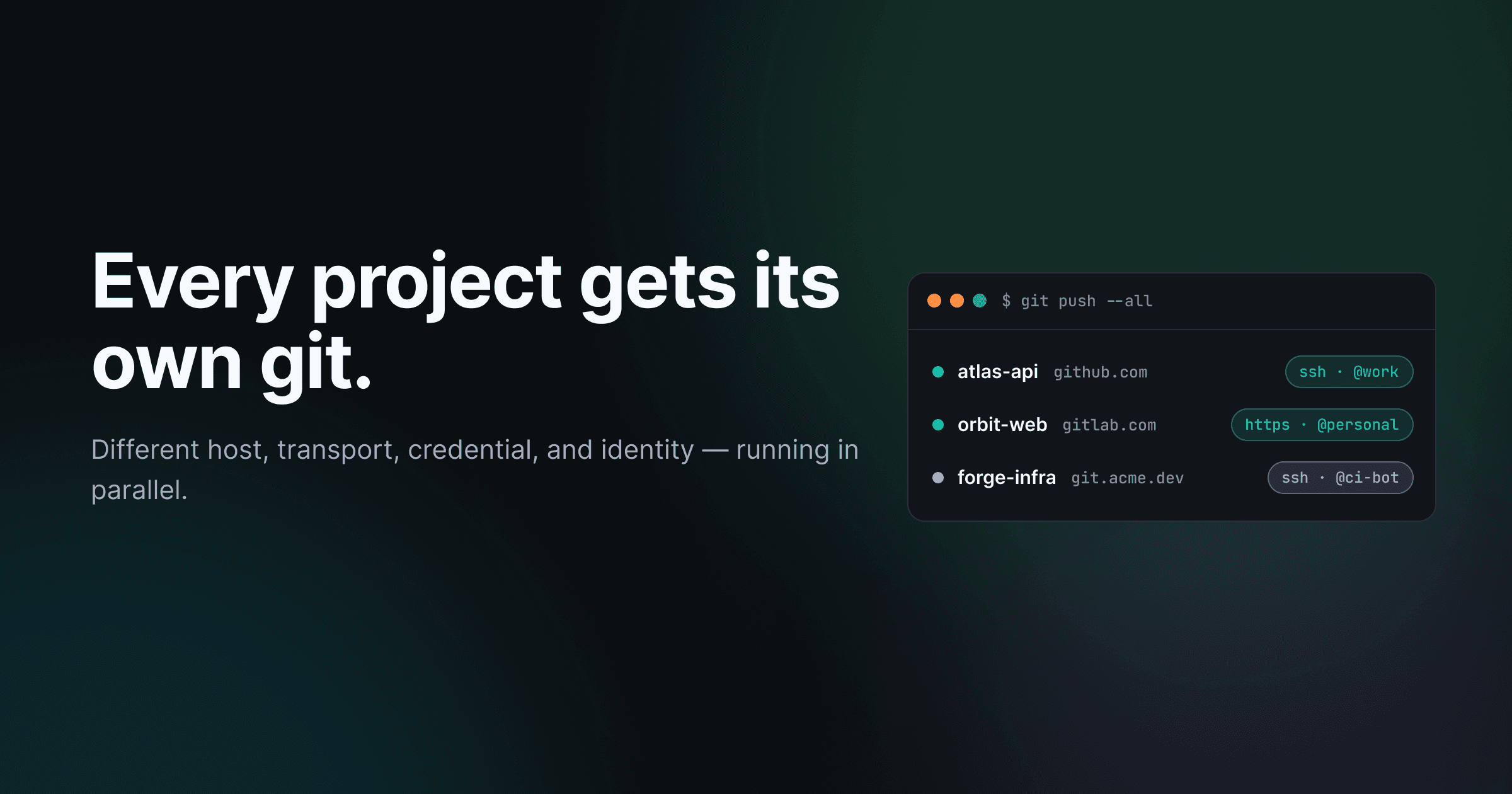
Most AI coding tools assume there is exactly one of you. One GitHub login. One git config. One remote. That assumption holds right up until a real team opens its real laptop — where work lives on the company's GitHub org, a side project lives on GitLab, an open-source fork lives on a self-hosted Forgejo, and you are a different person on each.
Trinity treats git as pluralistic. The host, the transport, the credential, and the identity are all per-destination configuration — not one global git context the whole machine shares. So you can run different projects against different git hosts, over different transports, as different accounts, all at once. Trinity's agents push to each using the right settings automatically.
This post is about the machinery that makes parallel multi-host git work — and why it doesn't collide.
The single-context assumption breaks teams
Open your terminal and run git config --global user.email. There is one answer. Run ssh-add -l. One agent, holding keys for the whole session. Set GH_TOKEN and it applies to every gh command you run. Git, as most tools wire it up, has a single ambient context: one identity, one credential, one door to the outside world.
That is fine for one human on one project. It falls apart the moment the work fans out.
You're shipping to the company org as your work account. The same afternoon you want an agent to open a PR on your personal GitLab project — as you, not the company bot. Next week a client's repo lives on their self-hosted Forgejo behind SSH-only access. With a single git context, each of these means stopping to re-point the global config, swap the active token, or juggle ssh-agent entries. Do two of them at the same time and they fight over the same global state.
For a tool that runs agents in parallel, a single shared git context isn't an inconvenience. It's a correctness bug waiting to happen.
Pluralistic git: a destination per scope, not a context per machine
Trinity inverts the assumption. There is no one git context. There is a destination — and a destination carries everything a push needs: which host, which door, which credential, which identity.
One process. Three destinations. No shared git state to collide over.
Three projects, three destinations, running concurrently in one process. Project A pushes to the team's GitHub org over SSH as your work account. Project B pushes to your personal GitLab over an HTTPS token. Project C pushes to a self-hosted Forgejo over SSH as a dedicated bot. None of them reaches for a shared global setting, because there isn't one to reach for.
A destination belongs to a scope — either personal or a specific team. That scoping is what lets your personal GitLab account and your team's GitHub org coexist without ever stepping on each other. Switching projects doesn't reconfigure git. It just resolves a different destination.
Tokens didn't go anywhere. HTTPS with a personal access token is still the default door and is fully supported. SSH is the new opt-in transport you choose per destination. The point isn't SSH over tokens — it's that you pick the door per destination, and Trinity remembers.
How a destination gets chosen
When an agent is about to push, Trinity has to answer one question: which destination? It resolves in tiers, narrowest first, and the first tier that answers wins.
First match wins
Override the narrow, inherit the broad — most repos never need more than the default.
A single repo can pin its own destination. If it doesn't, the project it belongs to can set one for all its repos. If the project stays quiet, the scope's default destination applies. And if you've only ever connected one account, that ambient account is the fallback — so the simple case stays simple and the complex case is expressible.
This is why a polyrepo project can hold one repo on GitHub and another on Gitea without any special mode. Each repo resolves its own destination at operation time. The override lives exactly where the exception lives, and everything else inherits the broad default. You can wire this up in project settings, where each repository can override the project default, and pick the destination and identity for a workspace's repositories right at workspace setup.
The door: HTTPS token or managed SSH, per destination
Every destination has a transport — Trinity calls it the door. It's a property of the destination, resolved at clone time, not a machine-wide choice.
The default door is HTTPS. Trinity hands git a token through GIT_ASKPASS so credentials never land in a remote URL or a log line. Nothing about that changed in this release; tokens remain first-class.
The new door is managed SSH. Choose it on a destination and Trinity generates a key pair, enrolls the public key with the host, and from then on runs git with GIT_SSH_COMMAND pointed at that specific private key — with IdentitiesOnly=yes, so SSH uses the key you mean and ignores whatever else is in your agent.
Credentials are local, per device, per host
Private keys live in a local credential store, partitioned per account and per host, with the key
itself at 0600. They are never synced. Each machine you work from enrolls and holds
its own key — so a leaked laptop is one key to revoke on one host, not your whole git life.
The transport choice is sticky. Re-saving a destination without touching the door leaves the door exactly as you set it — a small thing, but it's the difference between trusting the setting and re-checking it every time.
Identity: many accounts, even on the same host
Door answers how you connect. Identity answers as whom. And on a single host, that answer is rarely just one thing.
You are one person on github.com for your employer's org and a different person on github.com for your own repos. Trinity models identity in two tiers per host: a host-level default for the account, and per-namespace overrides for specific orgs or users. So a work account scoped to the team's org and a personal account everywhere else live side by side on the same host, and the right one is chosen by where the push is headed.
That's also why an agent can author a commit as a project's dedicated bot on one repo and as your own account on another, in the same run, without you switching anything.
Four hosts, one contract
A destination is only useful if Trinity can actually speak each host's API. Behind a single Forge interface, Trinity implements GitHub, GitLab, Gitea, and Forgejo (with Bitbucket present too), each with a compile-time capability floor so a missing capability is a build error, not a runtime surprise.
| Concern | Single-context git | Trinity |
|---|---|---|
| Host | One, implied by the remote | Per destination — GitHub, GitLab, Gitea, Forgejo |
| Transport | One global default | Per destination — HTTPS token or managed SSH |
| Credential | Shared ssh-agent / global token | Per account, per host, local to the device |
| Identity | One global user | Host default plus per-namespace overrides |
| Parallel pushes | Fight over global state | Independent — nothing shared to clash |
The forge layer also learned to count. List endpoints now paginate to completion and respect each provider's maximum page size — so a large account returns all its repositories instead of silently stopping at the first page, and never trips a provider's page-size limit. Small detail, but "we only saw your first 30 repos" is exactly the kind of bug that erodes trust in everything above it.
Why it doesn't collide in parallel
Here's the part that makes all of the above safe to run at once.
Every running story resolves its own host, transport, credential, and identity at operation time, and pins them for the duration of that work. All authentication is then threaded per command through environment variables — GIT_SSH_COMMAND, GIT_ASKPASS, GH_TOKEN — on the exact invocation that needs them.
What Trinity never does: git config --global. No shared ssh-agent. No process-wide token. There is no global git state for two concurrent operations to overwrite.
One git config --global and a shared ssh-agent for the whole machine
Two concurrent pushes fight over one global state.
Auth threaded per command via environment variables — no global config, no shared agent
GIT_SSH_COMMAND=ssh -i alice.key→ GitHub over SSH as AliceGIT_ASKPASS + GH_TOKEN=bob→ GitLab over HTTPS as BobNothing is read from a process-wide place, so two pushes never overwrite each other.
That is precisely why two stories can push at the same instant — one to GitHub over SSH as Alice, one to GitLab over HTTPS as Bob — inside the same process, with zero chance of one clobbering the other. The auth rides on the command, not in a place the next command reads. We audited the codebase specifically for shared git state that two operations could trip over. There wasn't any to find.
This is the part that turns multi-host from a feature into a capability. Anyone can support more than one host if you do them one at a time. Doing them simultaneously, as different identities, in one process, is a property of how the auth is plumbed — and it's the reason Trinity's parallel story execution works across hosts at all.
Where the field is, honestly
This is differentiation in degree and integration, not a claim that nobody else thought of multiple hosts. Plenty of tools have. The pattern across the leading autonomous coding agents is that each is built around a single host and a single connected identity.
GitHub's Copilot coding agent is GitHub-only by design — its documentation is explicit that for repositories on other hosts it "won't be able to work on it." OpenAI's Codex cloud agent documents only GitHub, authenticating through GitHub App installation tokens. Cursor's cloud agents were GitHub-first with partial GitLab support as of early 2026. Devin spans multiple hosts, but steers you to a single dedicated bot account rather than your own identities. And CLI agents are host-agnostic only because they defer to your local git config — whatever single context that happens to hold — and their parallelism runs across worktrees of the same repo and remote.
So the honest framing: as of mid-2026, the agents that span multiple hosts typically do so one connection or one bot account at a time. Running many projects with different hosts, transports, and identities side by side — that's the gap Trinity is built to close.
One process, every host
The single-context assumption was never wrong. It was just sized for one person on one project. Real teams outgrew it the moment their work spread across hosts and accounts, and most tooling is still trying to paper over that with a global config swap.
Trinity sizes git to the team instead. Host, transport, credential, identity — each is per-destination, each resolves at operation time, and each rides on the command rather than a shared context. That's what makes the same process push to your company's GitHub, your personal GitLab, and a client's Forgejo at the same time, as the right person on each.
If you remember one thing: git doesn't have to be singular. Configure the destination once and Trinity handles the rest — every project, every host, in parallel. See the full release in the 0.3.2 changelog.